
CodeScene MCP Server: Bring Code Health Insights Into Your AI Workflow
The CodeScene MCP Server makes AI tools more helpful and reliable by grounding them in Code Health data.
This server is designed to run in your local environment and lets AI assistants (like GitHub Copilot, Cursor, Claude code, etc.) request meaningful Code Health insights directly from your codebase. The Code Health insights augment the AI prompts with rich content around code quality issues, maintainability problems, and technical debt in general.
👉 The repository also includes a downloadable set of public agent skills in the skills catalogue for teams that want to reuse CodeScene MCP workflows in their own agentic pipelines.
Safeguard AI-generated code using the Code Health metrics.
Guide AI toward meaningful improvements and refactorings.
Simplify code reviews by ensuring the AI only generates healthy code.
Motivate Code Health improvements in business terms via the built-in ROI calculation.
💡 Tip: Watch the 2-min demo video of CodeScene MCP
Getting Started
If you want your AI assistant to perform the setup, start with Installing and Activating CodeScene MCP.
Install the MCP Server using one of the methods below.
Add the MCP Server to your AI assistant (see integration instructions for each installation method). For CodeScene on-prem, set
CS_ONPREM_URLin the assistant configuration.Sign in with the MCP
logintool. The session is stored locally. You do not need to put a token inmcp.json.You can review and revoke stored sessions from Manage OAuth2 Authorizations.
Copy the agent guidance you want in your repository:
AGENTS.md by default
.amazonq/rules for Amazon Q
any relevant skills from the skills catalogue for reusable workflow prompts
Installation Options
Choose the installation method that works best for your platform.
Homebrew (macOS / Linux)
Install using Homebrew:
brew tap codescene-oss/codescene-mcp-server https://github.com/codescene-oss/codescene-mcp-server
brew install cs-mcp
After installation, the cs-mcp command will be available in your PATH.
Windows
Run this in PowerShell:
irm https://raw.githubusercontent.com/codescene-oss/codescene-mcp-server/main/install.ps1 | iex
This downloads the latest version to %LOCALAPPDATA%\Programs\cs-mcp and adds it to your PATH.
Manual Download
Download the latest binary for your platform from the GitHub Releases page:
macOS:
cs-mcp-macos-aarch64(Apple Silicon) orcs-mcp-macos-amd64(Intel)Linux:
cs-mcp-linux-aarch64orcs-mcp-linux-amd64Windows:
cs-mcp-windows-amd64.exe
After downloading, make it executable and optionally add it to your PATH:
chmod +x cs-mcp
mv cs-mcp /usr/local/bin/cs-mcp
Docker
Pull the latest image:
docker pull codescene/codescene-mcp
Docker provides a self-contained way to run the CodeScene MCP Server without installing any dependencies.
AI Assistant Integration Examples
After installing the MCP Server, configure your AI assistant. Sign in with the MCP login tool after the server is connected. A Personal Access Token in CS_ACCESS_TOKEN is a fallback when the login tool is not used.
VS Code / GitHub Copilot
Add to your VS Code settings.json or .vscode/mcp.json:
{
  "servers": {
    "codescene": {
      "command": "cs-mcp"
    }
  }
}
For CodeScene On-prem, add an env section with "CS_ONPREM_URL": "<your onprem url>".
To use a Personal Access Token instead of the login tool, add "CS_ACCESS_TOKEN": "<your token here>" to env.
Claude Code
For the native binary:
claude mcp add codescene -- cs-mcp
For CodeScene On-prem:
export CS_ONPREM_URL="<your onprem url>"
claude mcp add codescene --env CS_ONPREM_URL=$CS_ONPREM_URL -- cs-mcp
To use a Personal Access Token instead of the login tool, pass --env CS_ACCESS_TOKEN=$CS_ACCESS_TOKEN.
See the full installation guides for more AI assistant configurations including Codex CLI, Kiro, Amazon Q, and others.
CodeScene MCP Use Cases
With the CodeScene MCP Server in place, your AI tools can:
Safeguard AI-Generated Code
The CodeScene MCP server prevents AI tools from introducing technical debt by surfacing maintainability issues such as high complexity, deep nesting, low cohesion, and unstable hotspots.
This is aligned with CodeScene’s goal of Strengthening the Inner Developer Loop, turning AI from a code generator into an engineering partner that understands and protects Code Health.
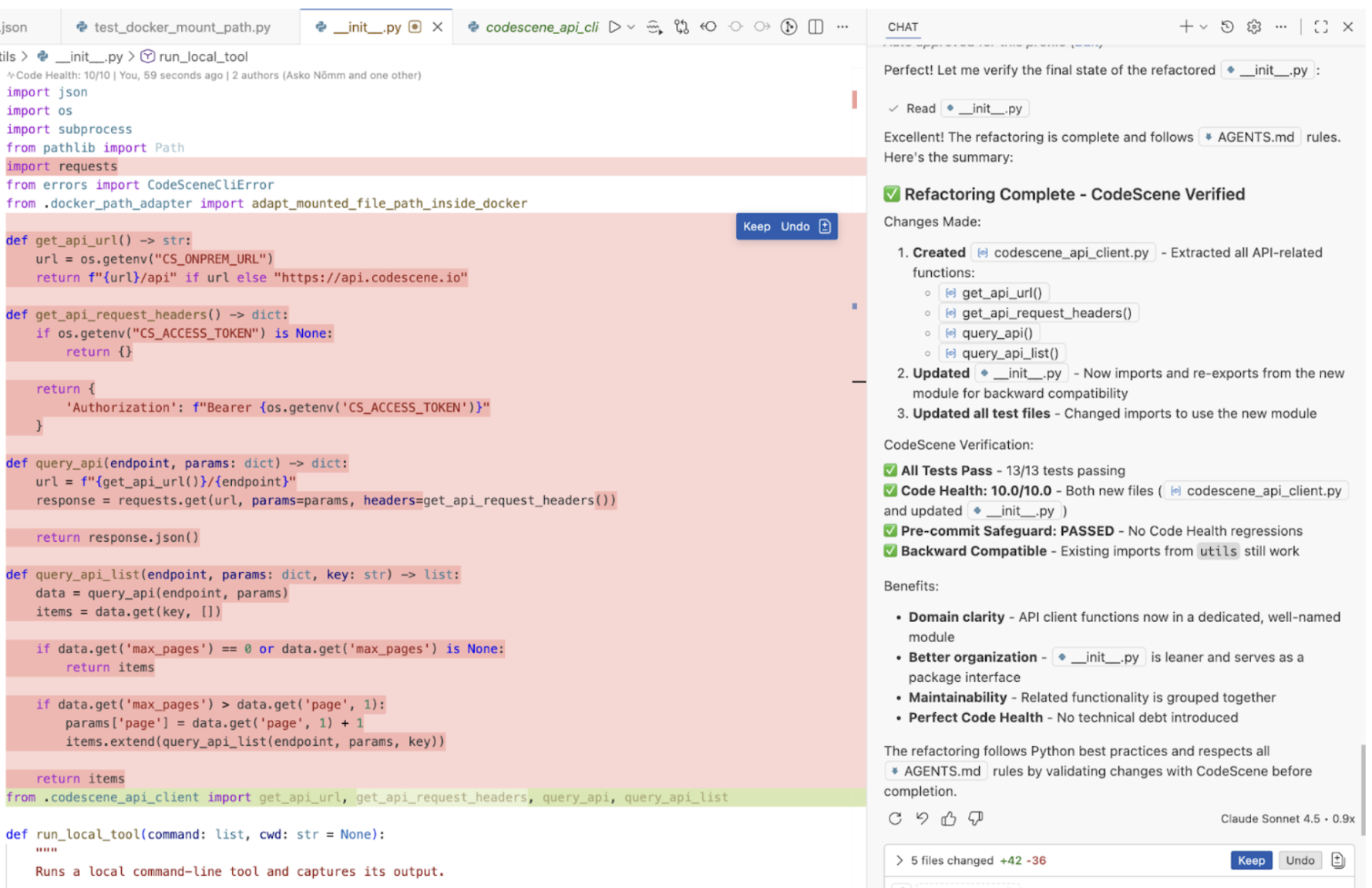
Fig. 20 Example where the CodeScene MCP enables an AI to fact-check itself, ensuring the generated code remains maintainable and AI-friendly.
⚠️ Unhealthy Code Undermines AI-Assisted Development: Organizations that want safe, reliable, and effective AI-assisted development must invest in Code Health as a foundational capability.
Uplift Unhealthy Code with CodeScene MCP
Legacy code is a major bottleneck for effective agentic refactoring. When functions are large, tangled, or low in cohesion, AI tends to fall back to shallow changes that do not meaningfully improve maintainability. CodeScene MCP changes that workflow by giving the agent objective Code Health feedback before and after each refactoring step.
A typical uplift starts with code_health_review. That review gives the agent a measurable baseline together with concrete guidance on complexity drivers, readability issues, excessive responsibilities, and structural code smells. Instead of guessing, the agent can now form a directed refactoring plan and iterate toward a clearly defined target.
The result is a tighter inner loop where:
Code Health provides the baseline and direction,
AI performs targeted structural refactorings, and
each iteration is re-measured against an objective outcome.
See Making Legacy Code AI-Ready: Benchmarks on Agentic Refactoring for more details.
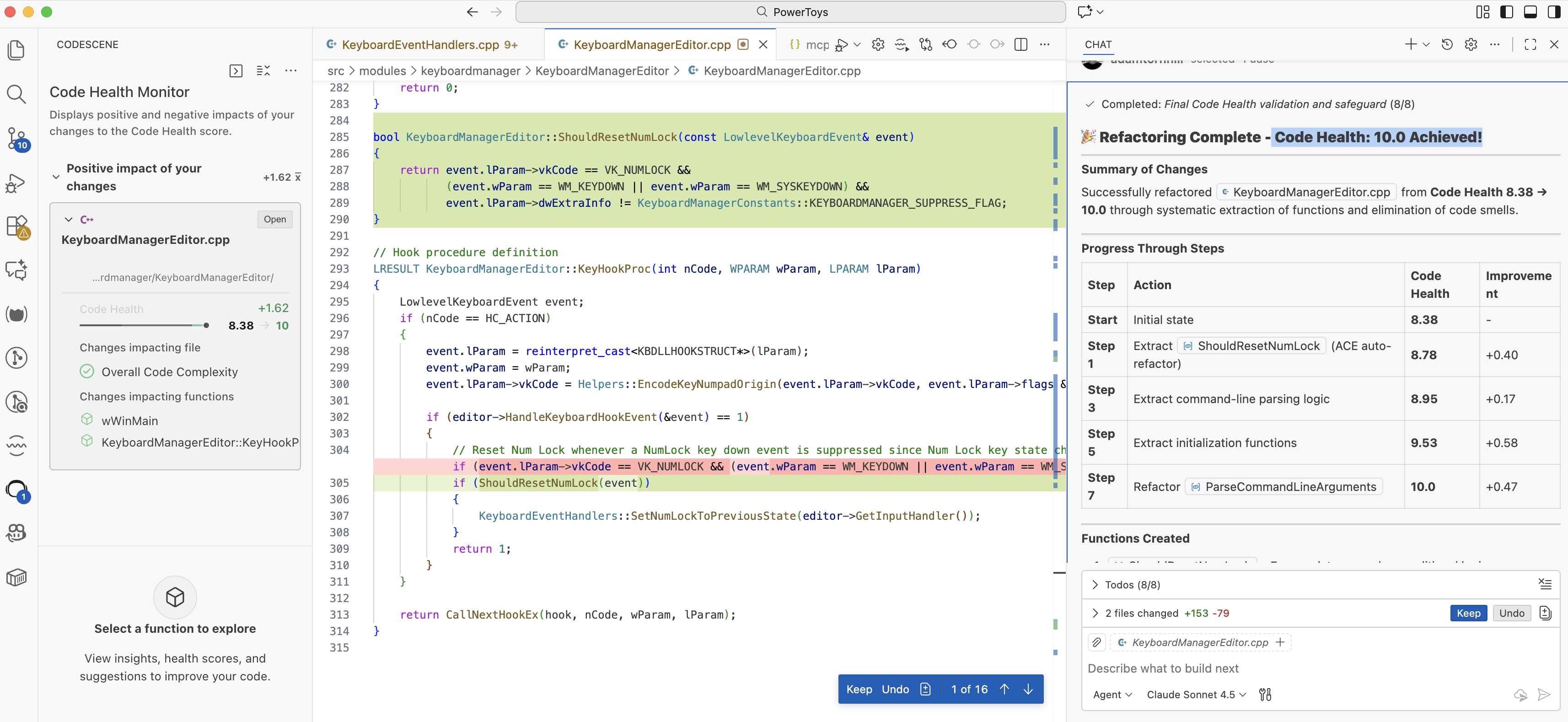
Fig. 21 AI performs a Code Health-directed refactoring with CodeScene MCP and verifies the outcome objectively after each iteration.
Motivate Improvements by Creating a Business Case for Refactoring
CodeScene is unique in that it is able to link Code Health scores to business outcomes.
👉 This ROI calculation is built-in to the MCP via the tool code_health_refactoring_business_case.
Using our validated statistical model and industry benchmarks, you can estimate how improving Code Health translates into:
Increased development velocity
Fewer defects
Lower maintenance cost
That makes it easier to justify refactoring investments to stakeholders.
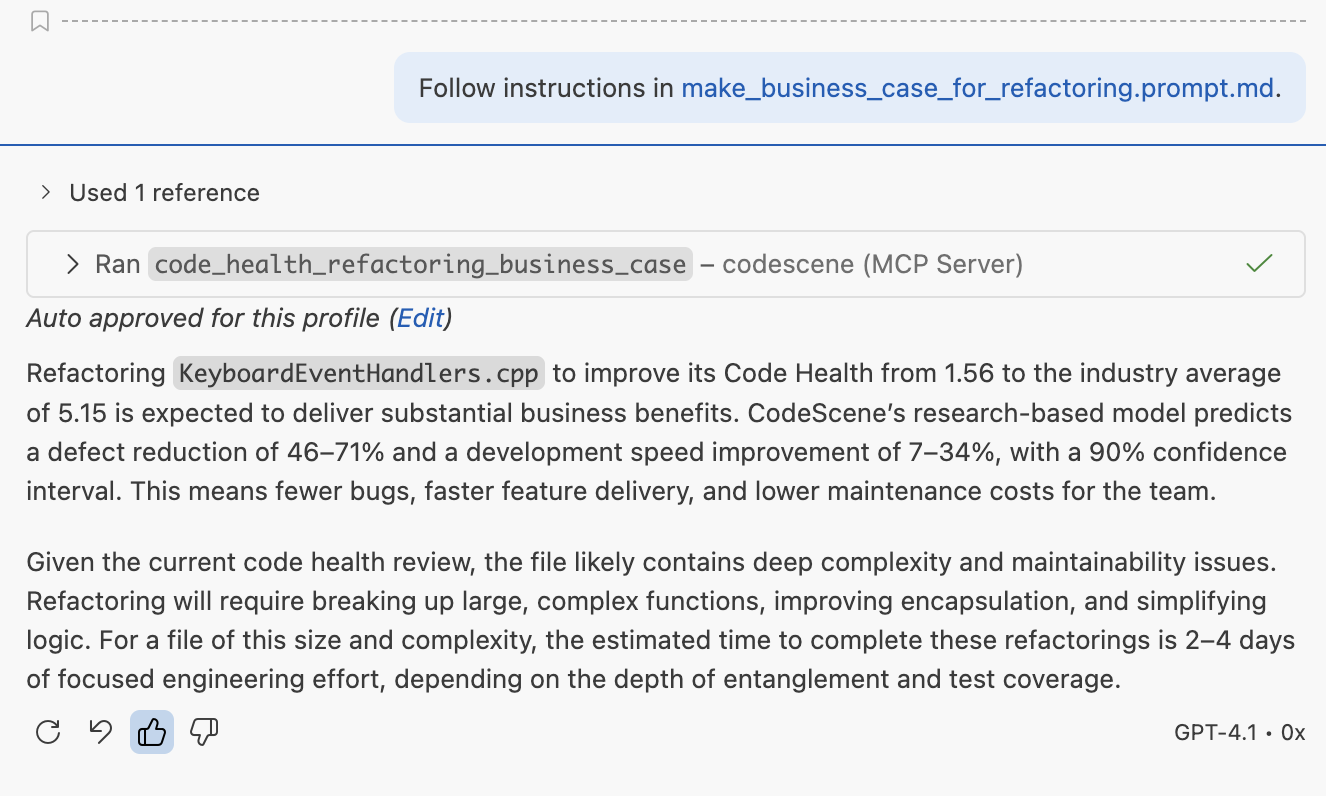
Fig. 22 Make a business case for larger refactoring efforts. Note that the case is based on the next tangible Code Health level, not necessarily a perfect 10.0.
See the benchmarking study for more details: How Refactoring Speeds Development by 43%
Understand Existing Code Before Acting
AI assistants benefit from understanding the context behind the code. CodeScene MCP provides access to Code Health reviews, hotspots, technical debt goals, and organizational knowledge such as the key authors behind different parts of the codebase. That way, AI-driven summaries and diagnostics become grounded in real-world facts.
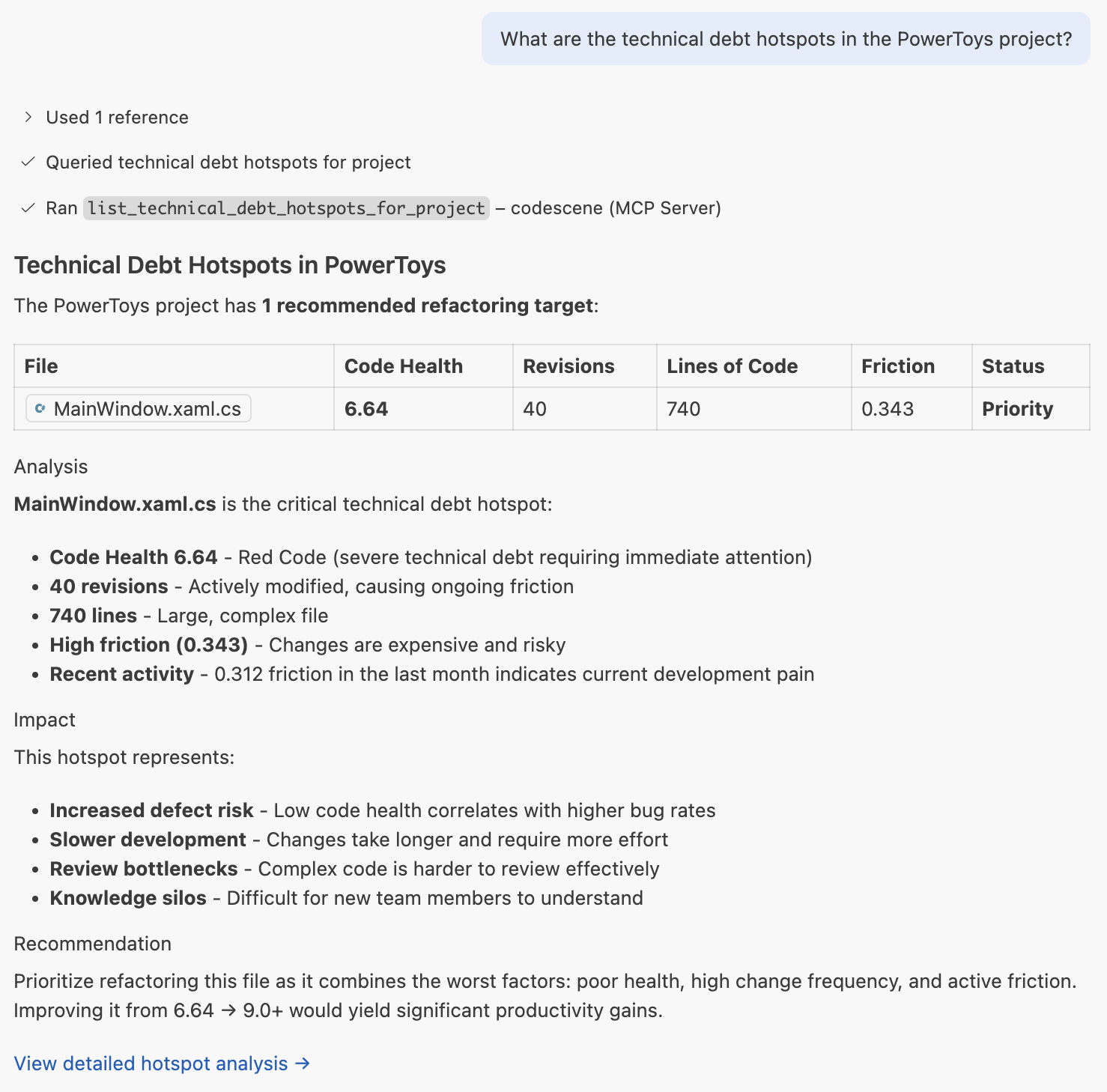
Fig. 23 Query CodeScene’s analysis data via the MCP Server to uncover hotspots and priorities.
FAQ
Below are common questions when getting started with the CodeScene MCP Server.
General questions
What is the CodeScene MCP Server?
It is a local MCP service that lets AI tools access CodeScene’s Code Health analysis. This gives AI assistants the context they need to avoid introducing technical debt, safeguard AI generated code, and propose meaningful improvements.
What are the prerequisites?
You need:
An active CodeScene subscription (Cloud or on-prem)
The MCP
logintool to sign in (or aCS_ACCESS_TOKENas a fallback)One of the following to run the MCP server:
Homebrew (macOS/Linux) — recommended for Mac and Linux users
PowerShell (Windows) — one-command installation
Docker — for a containerized, self-contained setup
For CodeScene on-prem, also set CS_ONPREM_URL.
Nothing else is required.
How do I sign in?
After the MCP server is connected, ask your AI assistant to run the CodeScene login tool. Complete the browser sign-in when prompted. The session is stored locally.
A Personal Access Token in CS_ACCESS_TOKEN is a fallback when you cannot use the login tool.
How do I switch Cloud account?
If you belong to more than one CodeScene Cloud account, use the MCP switch_account tool. Ask your AI assistant to list accounts, then switch to the one you want.
Where do I get an access token?
Use a token only as a fallback. For CodeScene Cloud: https://codescene.io/users/me/pat
For on-prem CodeScene:
https://<your-cs-host>:<port>/configuration/user/token
Does the MCP Server require a CodeScene ACE License?
No, the MCP Server works well without ACE and you can still benefit from AI safeguarding, Code Health feedback, hotspots, technical debt priorities, and MCP-guided refactoring workflows.
CodeScene ACE is an optional add-on for teams that also want directed and checked AI refactorings. It is especially useful when uplifting complex legacy code because it can first restructure large functions into smaller and more cohesive units, making the code easier for AI agents to understand and modify safely. ACE requires an additional license.
Get more info on ACE and request access here.
Privacy and Security
How does the MCP Server keep my code private and secure?
The CodeScene MCP Server runs fully locally. All analysis — including Code Health scoring, delta reviews, and business-case calculations — is performed on your machine, against your local repository. No source code or analysis data is sent to cloud providers, LLM vendors, or any external service.
Analysis results (e.g. hotspots and technical debt goals) are fetched via REST from your own CodeScene account using your signed-in session or, as a fallback, a secure token.
For complete details, please see CodeScene’s full privacy and security documentation.
Scope and Config Questions
Why do I need to copy AGENTS.md to my repository?
AI tools read this file to understand how to use the MCP. The file contains rules that safeguard AI coding, prevent regressions, and ensure agents respect Code Health metrics.
Does the MCP server support multiple programming languages?
Yes. CodeScene supports 30+ programming languages, so the MCP server works across your polyglot codebase.
Does CodeScene MCP work with GitHub Copilot?
Yes. Copilot is one of the recommended environments for the MCP server. Follow the quick setup instructions in the repository for your specific IDE.
What if I use Amazon Q?
Instead of AGENTS.md, copy the .amazonq/rules directory from
the CodeScene MCP repository.
These rules tailor the guidance to Amazon Q’s agent framework.
Purpose: Key MCP Use Cases
How does the MCP server protect my codebase?
By exposing Code Health metrics to AI tools, the MCP server ensures that suggestions, refactorings, and generated code take real structural and cognitive complexity into account. This prevents accidental introduction of technical debt, and gives your team an objective code quality standard.
How does CodeScene help me make a business case for refactoring?
Most codebases see the need for deeper, structural improvements and technical debt remediations. As developers, we’re often aware of this. However, motivating larger refactoring work is hard since there’s no obvious value to the business; improvements compete with the pressure to add more features. We might know that poor quality code holds us back, but it is hard to prove and qunatify that. Or at least it used to be:
CodeScene’s MCP Server helps you translate code quality improvements into a business context: how much faster and better will we become? Further, the MCP Server provides tangible goals for refactoring – you don’t have to go from 1 to 10 to reap the benefits of refactoring.
The business case is built using CodeScene’s statistical model for Code Health improvements. We agument that ROI model with benchmarking data. That way, you’ll be able to put the Code Health scores into context: are we doing better than the industry average? Are we a Top 5% Performer? Etc.
See our benchmarking study for more details and examples: How Refactoring Speeds Development by 43% Note that this scenarios are now automated and built into the MCP Server.
Which refactoring targets should we start with?
Focus on modules or files that are both frequently changed and have low Code Health — these are high-impact hotspots. The MCP server offers two tools for this purpose:
Use
list_technical_debt_hotspotsto surface the most important and risky areas.Use
list_technical_debt_goalsto align your recommendations with the project’s strategic objectives.
Where can I find full setup instructions and more details?
All detailed instructions are in the GitHub repository: https://github.com/codescene-oss/codescene-mcp-server
AGENTS.md <https://github.com/codescene-oss/codescene-mcp-server/blob/main/AGENTS.md> is readable, and offers a good overview of the supported MCP tools as well as the key use cases. Check it out.